
I've dabbled in front-end work before, but every time I ended up touching small details: some HTML element here, what some CSS property means there, or writing a bit of JavaScript and the like. I always felt I lacked a higher-level understanding of the front end.
I'd occasionally hear metaphors about the three pillars of the web page: HTML is the skeleton, responsible for the page's structure; CSS is the skin, responsible for how the page looks; JavaScript is the muscle, powering the page's interactions. But that kind of description seems too broad to give you a concrete understanding.
So this post tries to lay out something between that metaphor and the low-level details. By describing the core role of HTML, CSS, and JavaScript in turn, I want to see whether I can get that bird's-eye view.
First, let's distinguish two front-end concepts: "typesetting" and "layout."
See two answers on Zhihu (a Chinese Q&A site): Typesetting and layout are two different things and Layout and typesetting are different
"Layout" refers to the macro-level division of the GUI, for example when you have several large blocks and want to arrange them in a specified way.
"Typesetting" refers to things like this: you have some paragraphs containing different fonts and font sizes, and you align them to different baselines, wrap lines, break words, and handle overflow sensibly.
Starting from the web page
A web page is the networked aggregate of all kinds of real-world information carriers
The web page is the most direct visible part of the front end. Its purpose is to "present information," and everything else serves that purpose. A web page isn't fundamentally different from any other carrier of information. Think of the information carriers we see in daily life: a Word document, a PDF, a questionnaire, a financial statement, and so on. A web page is a networked aggregate version of these carriers.
When humans look at a web page, what are they looking at?
Just as we treat the information carriers in our lives and the information they hold, we treat web pages in a similar way: first we pay attention to the content the document presents. If the content is formatted beautifully, we may enjoy reading it more and be more willing to read further. And if the carrier has a bit more interactivity, it's even more engaging.
In other words, when humans look at a web page, the order is still content -> style, interaction. Of course, as web pages grow richer and more colorful, style and interaction get more and more weight, to the point of being as important as the content.
Content corresponds to HTML; style and interaction are determined jointly by CSS and JavaScript.
HTML: a semantic document flow
The "two semantics" of a web page
Of course, as an information carrier a web page differs from physical objects in everyday life. Although the ultimate audience for the information on a web page is human, it reaches them through browsers, search engines, or other programs that can process web pages. This gives rise to two kinds of semantics on a web page:
The first is the meaning that is ultimately presented, understood by humans; this is semantics in the everyday sense.
The second is understandable by machine programs such as browsers and search engines; it is "machine-readable semantics."
The semantics ultimately presented are determined by human knowledge structures: humans interpret different content on a page as elements with specific meanings, such as "title," "body," "footnote," and "navigation." This is exactly why some HTML elements come with certain styles built in. Headings h1 through h6, for example, have a larger font size and are bold. That matches human common sense and fits the meaning to be presented, so this default is very convenient.
The second kind, machine-readable semantics, in the sense above, serves the first kind. Browsers, search engines, and other programs recognize the semantic elements in HTML code, then add styles and so on to present the final result. The more semantic the HTML, the easier it is for machines to understand. In software, semantics is usually built on sensible "structuring." Structuring means distinguishing content with different meanings by giving it different structures, and in HTML that structuring is done with the various HTML tags.
Presenting the first kind of semantics in a friendlier way is the overall goal of a web page. That takes close collaboration among designers, information architects, and programmers.
Making the second kind of semantics serve the first kind better is the essential work of the programmer.
Why the second kind of semantics matters
There's a very apt example of why the second kind of semantics matters. I don't know if you've run into this on your smartphone:
When you need to type something on a website, a keyboard pops up. But different input fields bring up different keyboard layouts: when you type an email address you get a keyboard with the @ symbol, when you type a password you get the full keyboard, and so on. Stranger still, this sometimes works and sometimes doesn't. When it works, typing feels very smooth. When it doesn't, you have to switch keyboard layouts by hand to find the symbol you need, which is really annoying.
Behind this is the second kind of semantics at work: in HTML there are many different types of input fields, some email, some password, some text. If a website distinguishes these meanings well and uses them in its HTML, the keyboard pop-up behaves very intelligently, because the machine can choose which layout to show based on the different semantics in the HTML. If it's email, it shows the layout with @; if it's a password, the full keyboard; and so on. Sites with poor semantics can't do this. They just show the generic layout, and the human has to figure it out and switch.
This example shows that as browsers and other software get smarter, semantic HTML becomes more and more important.
As mentioned above, browsers generally give certain HTML elements certain styles, but only because that matches human common sense and is convenient. Never use an element because you want a certain style; instead, choose the element whose meaning best fits the content you're marking up. Styling should be left to CSS. This is also why people sum it up as: "HTML cares only about semantics, not layout, and not style or interaction."
Understanding a web page through HTML semantics
Having covered why semantics matters, let's look at how to understand a web page through these elements of the second kind. Quite a few elements are involved here, so this is only a rough outline.
First, web pages have quite a few semantic elements for presenting information.
The most basic ones, like
<!--header-->
<header></header>
<!--main body-->
<main></main>
<!--footer-->
<footer></footer>
<!--paragraph-->
<p></p>
<!--section-->
<section></section>
<!--self-contained piece-->
<artical></artical>
...
and more specific ones:
<!--time-->
<time></time>
<!--address-->
<address></address>
...
These are all ordinary semantic elements for presenting information. But just as in real life, there are other ways to present information that help humans read and understand it better. For example:
Lists
They lay out the core information point by point and category by category, letting people quickly grasp the key aspects of something. In HTMLEmbedded elements
Such as images; a picture is worth a thousand words.
And music, video, and so on
Also, in real life we often hand out paper forms to collect information, and use reports to clearly present information sorted into categories in a fairly structured format. HTML has corresponding semantic elements for these:
- Forms (form)
- Tables (table)
They serve much the same purpose as their real-life counterparts. HTML forms come in many types: radio buttons, checkboxes, input fields (and input fields themselves have finer-grained semantic types). That mirrors the many kinds of surveys and forms in real life.
HTML also has some semantic elements of its own. For example:
<!--link, perhaps the most important unique element: it ties pages together over the network-->
<a></a>
<!--some other elements, which describe relationships between pages, page information, and so on-->
<link>
<meta>
Those are basically the kinds of HTML elements there are. Combined, they include parts for collecting information and parts for presenting it, and to present information better, HTML provides many semantic elements.
Put together, these elements form all the semantic information of a web page. They can implement and imitate almost every real-world information carrier, and in some respects even surpass them.
The document flow
Besides the elements mentioned earlier that carry some styles based on common sense (if those count as typesetting styles), HTML also has a simple default way of laying things out (let's call it layout style): elements are arranged in order from top to bottom and left to right. To put it more vividly, this is called the HTML document flow.
This default document flow gives HTML a common-sense, most basic layout, so that elements don't all end up heaped together in a mess. But I'll stress it again: although browsers give HTML some default styles and layout, these are all based on human intuition and common sense: "HTML cares only about semantics, not layout, and not style or interaction."
DOM
DOM stands for Document Object Module, that is, the Document Object Model. Here is the explanation from W3.org:
What is the Document Object Model?
The Document Object Model is a platform- and language-neutral interface that will allow programs and scripts to dynamically access and update the content, structure and style of documents. The document can be further processed and the results of that processing can be incorporated back into the presented page.
Why the Document Object Model?
“Dynamic HTML” is a term used by some vendors to describe the combination of HTML, style sheets and scripts that allows documents to be animated. The W3C has received several submissions from members companies on the way in which the object model of HTML documents should be exposed to scripts. These submissions do not propose any new HTML tags or style sheet technology. The W3C DOM Activity is working hard to make sure interoperable and scripting-language neutral solutions are agreed upon.
What are those two paragraphs saying?
In other words, the DOM is the Document Object Model. It isn't part of some specific language's standard library or anything like that; it's a model independent of language and platform. Any other language that wants to manipulate HTML documents (actually not just HTML, but also XML and some other structured languages) has to design its way of doing so according to this object model.
The reason the DOM came about is that a bunch of people used to be at each other's throats: you had your ideas, I had mine. To unify the martial world, the W3C proposed the DOM and has kept standardizing it, which is good for everyone.
The DOM itself is a fairly complex thing, but for the DOM we use day to day, it's enough to know roughly what it looks like and how to manipulate it to count as getting started. When we talk about the DOM, we really mean a tree structure of HTML:
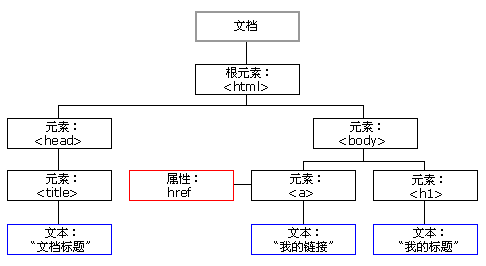
With the tree structure in the figure above, other languages that implement DOM manipulation, such as JavaScript, can operate on these nodes according to certain rules. The DOM tree itself also defines some concepts of inheritance, which make it easier to control its nodes.
Summary
That's basically the whole core of HTML. To sum it up in a few words: semantics, common-sense default styles for elements, the document flow, and the DOM.

We meet by chance in this world.
I’m XingHua — glad to meet you.